Pose Tool 3D
- 4.1
- Rating
- 10.00K
- Installs
- $6.99
- Price
 Analysis by App-foxy
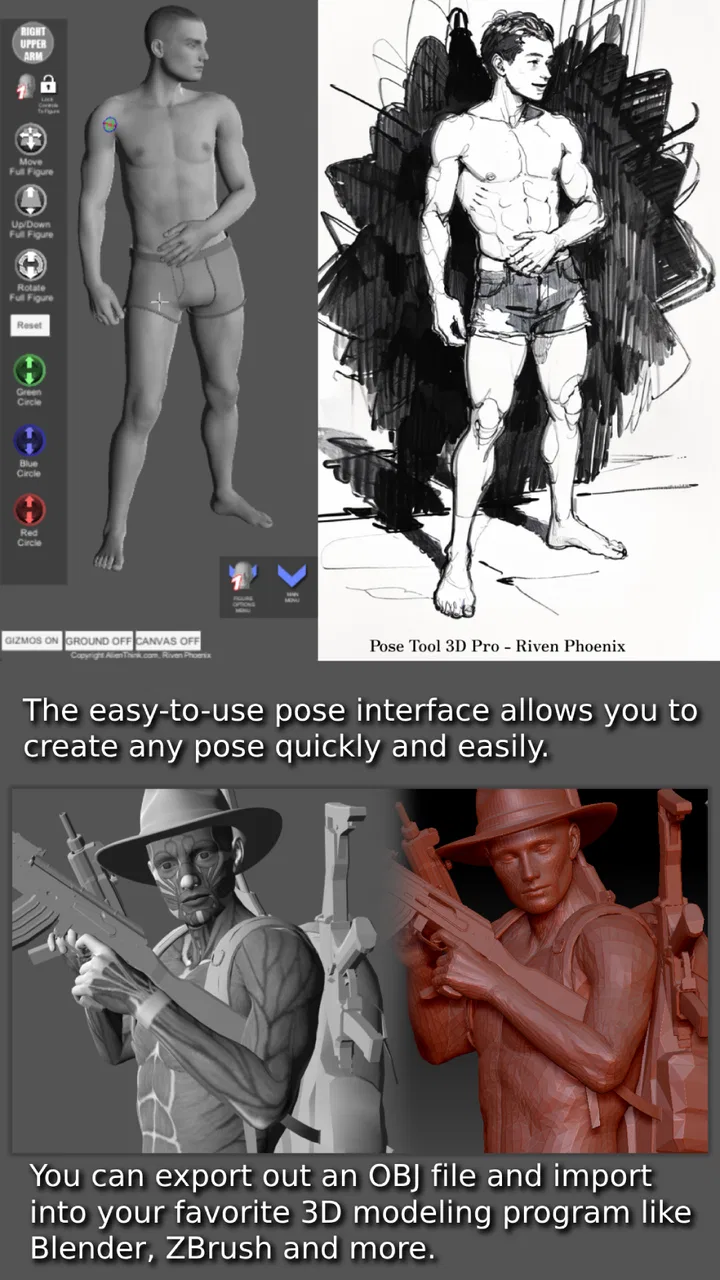
When I need a human reference quickly, I usually want something more flexible than a stack of anatomy books and less awkward than trying to photograph a friend in exactly the right position. Pose Tool 3D is built for that narrow but useful job: it gives artists a manipulable three-dimensional human figure that can be arranged into a pose for drawing. After spending time with it, I see it less as a complete art studio and more as a focused reference tool that helps me solve the “how does this body actually sit, twist, or balance?” problem.
The app belongs to the Comics category, and that description makes sense because its strongest audience is anyone drawing characters, panels, illustrations, or gesture studies. It is made by Riven Phoenix and costs $6.99. That price places it above many casual reference apps, so the value depends heavily on whether you will use a pose tool repeatedly rather than only once or twice. For me, the appeal is the speed of changing a figure instead of searching through unrelated images every time a pose becomes difficult.
Its age rating is Everyone, which fits the basic concept: the app is an art reference utility rather than a social platform or entertainment title. It was released on Oct 14, 2012, and the current version is 6.8.181. That long history suggests a product that has remained focused on its original purpose instead of constantly expanding into a general-purpose drawing suite. The average rating is 4.1 from around 1.6K ratings, while roughly 331 written reviews give a useful indication that people have formed fairly clear opinions about its practical value.
You May Also Like

 AccuWeather: Weather Radar
AccuWeather Review: A Quick, Clear Forecast for Everyday Decisions
For everyday plans, the best forecast is the one you can understand quickly. AccuWeather makes rain timing, radar, and local conditions easy to act on, with a few trade-offs.

 Hill Climb Racing
Why Hill Climb Racing Still Turns Crashes Into One More Run
A tiny car, a bumpy hill and one more upgrade: Hill Climb Racing keeps resurfacing because its simple chaos makes every near-miss feel personal.

 AliExpress - Shopping App
AliExpress Makes Global Shopping Feel Personal, but Shoppers Bear the Risk
AliExpress turns a global marketplace into a pocket-sized discovery engine. Its reach is useful, its shopping loop compelling, and its trade-offs easy to miss.

 Lords Mobile: Kingdom Wars
Lords Mobile Is a Kingdom-Building Routine, Not a Quick Match
A case-by-case verdict on the building, battles, device demands, and social commitments that make Lords Mobile rewarding for some players and exhausting for others.

 PDF Scanner app - TapScanner
TapScanner Makes Paperwork Easier to Capture, Check, and Share
TapScanner makes scanning with a phone feel less like a rescue operation and more like a dependable step in getting work done. Its capture tools are useful, though not flawless.

 Block Blast!
 Shows How Much a Puzzle Game Can Leave Out
A quiet grid game shows why puzzle players increasingly value instant clarity, repeatable skill and low-pressure play—and where the genre still needs to catch up.
More From Our News Desk
View All News


How Pose Tool 3D fits into an artist’s actual workflow
The basic workflow is easy to understand. I start with the human model, adjust the body into the position I need, and use the result as a guide while drawing elsewhere or directly beside it. The important difference from a static reference image is control. If the shoulder angle is wrong, I can change the shoulder. If the legs need to be wider, I can reshape the stance. That makes the app especially useful when a drawing requires a pose that is too specific to find through ordinary image searches.
I find it most helpful during the rough stage of a drawing. Before worrying about clothing, hair, facial expression, or polished anatomy, I can use the figure to check the overall line of action and the relationship between the torso and limbs. A pose that looks convincing in my head can become strangely stiff once I put it on paper. A three-dimensional reference exposes that problem early, when correcting it is still cheap.
One practical technique is to use the model as a construction guide rather than tracing every visible contour. I pay attention to the direction of the rib cage, the tilt of the pelvis, the elbows, knees, and weight-bearing foot. Those landmarks give me a believable skeleton for a comic character, even when the final character has exaggerated proportions. This is a better use of the app than treating the mannequin as a finished anatomy lesson.
The tool also works well for repeated characters. Suppose I am drawing a short comic scene in which someone turns, reaches for a cup, and then reacts to a sound. I can build each pose around the same basic body logic instead of inventing three unrelated figures. The result is more consistent, particularly in the spacing between the shoulders, the bend of the spine, and the placement of the hands. That consistency is one of the quieter benefits of having a manipulable figure available.
Why the three-dimensional reference matters
A photograph gives me one camera angle and one performer’s proportions. A pose library gives me a selection, but the exact gesture I need may not be there. Pose Tool 3D sits between those options. It is not a substitute for observing real people, because real bodies have clothing, soft tissue, asymmetry, and natural tension. Still, it is much better than guessing the hidden side of a pose from a single flat image.
The depth of a pose is particularly valuable for foreshortening. When an arm points toward the viewer, its apparent length changes dramatically. The same happens with a knee coming forward or a torso leaning away. These are the moments when I am most likely to make a character look flat. Rotating and adjusting a three-dimensional figure gives me a clearer sense of what should overlap and what should remain visible.
There is also a useful separation between reference and style. I can use the figure to understand structure, then redraw it with a different body type, costume, or visual language. That matters for comic artists who do not want every character to look like a neutral mannequin. The model supplies spatial information; the artist still has to make the drawing expressive.
Mobile use: helpful in some places, awkward in others
On a phone, the app makes the most sense when I am working away from a desk. I can keep it beside a sketchbook, use it during a commute break, or check a difficult pose while sitting with a tablet that handles the final drawing. A phone is small, but that can actually encourage quick reference checks instead of turning every anatomy question into a long research session.
The trade-off is precision. Fine adjustments are naturally more comfortable on a larger screen, especially when several body parts need to be positioned in relation to one another. On a compact phone, my fingers can cover the model, and rotating the view may require more patience than I expect. I would choose a larger display when building a complex action pose, while the phone remains perfectly practical for checking a simple seated, standing, or reaching position.
Another mobile consideration is attention. Pose Tool 3D is not something I open for passive browsing. It asks me to think spatially and make deliberate adjustments. That is good for focused work, but it means the app may feel demanding if I only want instant inspiration. A conventional image search or a ready-made pose collection is faster when the goal is to browse many visual ideas rather than construct one precise reference.
For a realistic everyday scenario, imagine I am sketching a comic panel in a café and realize that the character’s rear leg should be visible behind the front one. Instead of searching for a photograph with the same camera angle, I can create the stance, rotate the figure slightly, and inspect the overlap. I may still simplify the anatomy in the final panel, but I have solved the spatial problem without leaving the sketch.
Network-dependent moments and what they mean in practice
Connectivity shapes the experience mainly around access and preparation. If I am downloading or updating the app, the usual store connection is part of the process. Once I am working, the most important question is whether the reference tool is available when I need it, rather than whether it offers a social or cloud-based experience. I do not treat it like a feed that depends on constant online activity; I treat it as an instrument I want ready beside my drawing.
That distinction affects how I plan a session. Before leaving home, I would open the app and make sure the version installed on my device is ready for use. I would also avoid assuming that every network condition will feel identical. A weak connection can make any initial access, update, or store-related task inconvenient, even when the actual drawing session does not involve browsing online content.
I am careful here not to confuse a focused interface with a promise of complete independence from connectivity. The useful lesson is simple: do the setup before an important drawing session instead of waiting until a deadline, a train journey, or a location with poor reception. That small habit prevents the app from becoming the bottleneck when the creative idea is already clear.
Failure, recovery, and protecting the work around it
Any pose application can become frustrating if an adjustment goes wrong. A figure may end up twisted in a way that is difficult to reconstruct, or I may lose track of which change caused the problem. My preferred recovery method is incremental work: adjust one region at a time, pause to inspect the silhouette, and save or record useful reference states through my normal art workflow rather than trying to perfect everything in one continuous movement.
This is especially important for action poses. I first establish the pelvis and rib cage, then place the limbs, and only afterward refine the hands, feet, and head direction. If the final arrangement looks wrong, I know where to return. Moving every joint at once creates a kind of visual fog, and recovery becomes harder because I cannot tell whether the imbalance comes from the hips, the spine, or the supporting leg.
I also recommend keeping the app’s role clear. It is a reference aid, not the only place where the finished work should exist. I would not rely on a temporary pose arrangement as the sole record of a paid commission. Once I have the useful angle, I transfer the important construction notes into my sketch or save a visual reference through the tools I normally use. That approach reduces the impact of accidental changes or an interrupted session.
If the app does not immediately give me a convincing result, I do not assume the model is useless. Often the problem is that I started with the hands or head before establishing balance. Returning to the center of gravity usually helps. Ask where the body’s weight is going, which foot carries it, and how the pelvis responds. Those questions turn a frustrating interface moment into an anatomy exercise.
Using data carefully while drawing
Because this is a compact artist’s tool rather than a general media app, I would not expect it to consume attention through constant content loading. Still, data-conscious use is sensible. I install updates when I have a reliable connection, avoid starting setup during a rushed mobile session, and keep my art files in the drawing application or storage system I already trust. The pose reference should support the workflow, not become the place where every project detail is scattered.
There is also a creative form of data awareness: do not confuse a model’s visual information with complete truth about human anatomy. A digital figure can show angles and proportions, but it will not automatically teach the compression of clothing, the stretch of skin, the unevenness of real posture, or the emotional force behind a gesture. I use it to verify structure, then add observation and design judgment myself.
That limitation becomes obvious with expressive characters. A neutral model may help me place a bent elbow, but it will not decide whether the character looks exhausted, defensive, playful, or threatening. I have to alter the shoulders, hands, neck, and silhouette to communicate that feeling. In other words, the app can reduce uncertainty about mechanics while leaving the most human part of the drawing to me.
Where it beats ordinary alternatives
Compared with searching for photographs, the strongest advantage is control over the exact pose and viewpoint. Search is excellent when I need real clothing, lighting, facial expression, or a specific activity. It becomes inefficient when I need to see around a body, change the camera angle, or make several small corrections. The three-dimensional figure handles those structural questions more directly.
Compared with a static pose reference book, the app is quicker for experimentation. A book can teach anatomy and provide beautifully observed examples, but it cannot respond when I need the front leg moved slightly inward or the torso turned away. I would still keep anatomy books for study, especially because they explain muscles and landmarks more deeply. Pose Tool 3D is better at immediate spatial problem-solving.
Compared with a full 3D modeling package, it is more approachable for a quick sketch. A professional modeling program can offer richer control, custom characters, lighting, animation, and scene construction, but that power comes with a steeper learning curve and more setup. If my only question is how a figure should lean in a panel, a specialized pose tool is less distracting. If I need costumes, props, environments, or a complete rendered scene, the larger package is the better choice.
Compared with a ready-made pose library, the decision comes down to speed versus specificity. A library is ideal for browsing dozens of gestures and discovering ideas I did not plan to draw. This app is more valuable when I already know the problem: a crouch from a low angle, a hand reaching across the body, or a character twisting while keeping one foot planted. I would choose the library for inspiration and the 3D tool for correction.
Who should use it, and who should skip it
I would recommend it to comic artists, character illustrators, students practicing gesture, and anyone who repeatedly struggles with perspective in human poses. It is particularly worthwhile for people who draw on mobile devices or move between a sketchbook and a digital workstation. The one-time price can make sense when it replaces repeated searches and helps prevent hours of correcting a badly constructed figure.
I would be more cautious if you are a beginner expecting the app to teach anatomy from the ground up. A pose model can show where parts are, but it does not automatically explain why a pose works or how muscles behave under movement. Pairing it with observation, gesture practice, and anatomy study will produce better results than treating the digital figure as an answer key.
I would also skip it if your main need is finished art, image editing, animation, or a large collection of photographic references. The focused design is its strength, but it is also the reason it will not replace a drawing app, a reference archive, or a full 3D production environment. Paying for a specialist tool is only sensible when its specialist task appears often in your work.
One of my favorite ways to use it is as a “perspective referee.” I draw a rough pose from imagination, build an approximate version in the app, and compare the two. I do not copy the model blindly. Instead, I identify the biggest disagreement: perhaps my imagined pelvis is too level, the far shoulder is too visible, or the supporting foot is not under the body. This turns the app into a feedback device rather than a crutch.
My connectivity verdict
Pose Tool 3D works best when I prepare it before I need it and then use it as a quiet, focused reference beside the actual artwork. Connectivity matters around installation, updates, and access conditions, but the artistic value comes from manipulating the figure rather than consuming an online stream. I would not choose it for browsing inspiration or collaborative sharing; I would choose it for resolving a specific pose with less guesswork.
After weighing the $6.99 cost against its narrow purpose, I think it is a sensible purchase for artists who regularly draw people and want adjustable three-dimensional guidance. The 10K-plus installs show that it serves a defined audience rather than trying to be everything for everyone. My recommendation is strongest for comic workflows, gesture practice, and difficult foreshortening. If those problems rarely appear in your work, a free image search or a book may be enough.
My final advice is to judge it by the number of times it saves you from rebuilding a pose. Used thoughtfully, it can shorten the frustrating part of drawing while leaving the expressive decisions in your hands. It will not replace observation or anatomy knowledge, and it may feel cramped or overly specialized on a small phone, but for a mobile-ready human pose reference, Pose Tool 3D has a clear purpose and earns its place when that purpose matches your everyday art routine.
FAQs for Pose Tool 3D
01What is Pose Tool 3D used for?
Pose Tool 3D is a reference and posing app designed for artists, illustrators, animators, and anyone who needs to study the human body from different angles. You can manipulate a 3D figure, adjust body positions, rotate the camera, and create custom references for drawing, character design, anatomy practice, comics, storyboards, and digital artwork.
02Can I customize the character’s pose and viewpoint?
Yes. The main purpose of Pose Tool 3D is to let you build and inspect poses interactively. You can move body parts, change the figure’s position, rotate the model, and adjust the viewing angle to find a useful reference. This is especially helpful when a static photograph does not show the perspective, gesture, or limb placement you need for your drawing.
03Is Pose Tool 3D suitable for beginners?
Pose Tool 3D can be useful for beginners because it provides a visual way to understand proportions, gesture, perspective, and body positioning without requiring an immediate professional model or photoshoot. However, new users may need some time to learn the controls and pose the figure naturally. It works best as a reference aid rather than a replacement for anatomy study.
04Does Pose Tool 3D include different models, poses, or features?
The available models, pose options, tools, and customization features can depend on the app version and the platform where it is installed. Before downloading, check the current store listing to confirm whether the version includes the specific body types, poses, lighting controls, backgrounds, or export options you need. Some advanced content or tools may also require an additional purchase.
05Is Pose Tool 3D free, and does it work offline?
Pose Tool 3D may be available as a free download, but pricing, advertisements, in-app purchases, and included features can vary between Android and iOS versions. Many core posing functions may work without a constant internet connection, although store verification, updates, or optional content could require connectivity. Review the latest permissions, pricing details, and device requirements before installing.
Pros
- Extensive 3D pose library helps with anatomy and gesture practice.
- Adjustable lighting makes it easier to study shadows and form.
- Models can be rotated and viewed from nearly any angle.
- Useful for artists
- illustrators
- animators
- and character designers.
- Pose references are available without needing to photograph a live model.
Cons
- Some advanced features may require an in-app purchase or subscription.
- The interface can feel overwhelming for first-time users.
- Detailed scenes may require a relatively powerful device for smooth use.
- Preset poses may still need significant adjustment for specific drawings.
- It is a reference tool
- not a replacement for learning anatomy fundamentals.

Pose Tool 3D
Gallery